When managing complex networks of connections, search functionality is critical. As platforms grow, users need ways to filter data without being forced through clunky, multi-step filter menus.
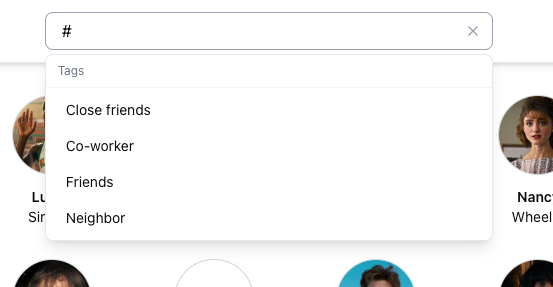
To solve this in our connections app, we decided to overload the existing search input. By detecting a # prefix, the search bar instantly switches from a standard text search to a contextual tag filter. This provides a clean, discoverable power-user experience.
Here is a look under the hood at how we architected this feature using React, TypeScript, and TanStack Query.
1. The Parsing Engine: Keeping Components Pure
The easiest way to introduce bugs in React is by stuffing complex string manipulation and filtering logic directly into component render cycles. To prevent this, we extracted the core logic into a pure, stateless utility file: searchUtils.ts.
This utility handles two distinct responsibilities:
- Parsing the raw input to determine the search "mode."
- Applying that mode to the data array.
TypeScript
import type { Person } from '../App'

export type ParsedSearch =
  | { mode: 'name'; query: string }
  | { mode: 'tag'; tagQuery: string }

/**
 * Evaluates the search string.
 * A leading '#' triggers tag mode. Otherwise, it defaults to name mode.
 */
export function parseSearch(raw: string): ParsedSearch {
  const trimmed = raw.trim()
  if (trimmed.startsWith('#')) {
    return { mode: 'tag', tagQuery: trimmed.slice(1).trim().toLowerCase() }
  }
  return { mode: 'name', query: trimmed.toLowerCase() }
}
By decoupling the parsing logic, we can test it independently of the UI. The filter function then consumes this parsed object. For tag searches, we use a case-insensitive substring match. This creates a progressive "filter-as-you-type" experience.
TypeScript
export function filterPeople(people: Person[], search: ParsedSearch): Person[] {
  if (search.mode === 'name') {
    if (!search.query) return people
    return people.filter(p =>
      (p.name || '').toLowerCase().includes(search.query)
    )
  }

  // Tag mode
  if (!search.tagQuery) return people  // Show everyone if only '#' is typed
  return people.filter(p =>
    (p.tags ?? []).some(tag =>
      tag.name.toLowerCase().includes(search.tagQuery)
    )
  )
}
2. Upgrading the Header with Contextual Suggestions
With the logic centralized, the next step is updating the Header component to respond to the user's intent. When the user types #, the autocomplete dropdown needs to stop querying names and start querying the global tag cache.
Because we manage our tag state with TanStack Query, we can pull the cached tags instantly without triggering unnecessary network requests.
TypeScript
import { useTags } from '../hooks/useTags'
import { parseSearch, filterPeople } from '../lib/searchUtils'

// Inside the Header component:
const { data: tags = [] } = useTags()
const parsed = parseSearch(searchQuery)

// Conditionally render tag suggestions
const tagSuggestions = parsed.mode === 'tag' && parsed.tagQuery.length === 0
  ? tags // Show all tags if just '#' is typed
  : parsed.mode === 'tag'
    ? tags.filter(t => t.name.toLowerCase().includes(parsed.tagQuery))
    : []
When tagSuggestions.length > 0, the UI renders a dropdown of clickable tags, complete with their assigned color dots. Selecting a tag auto-fills the search input with the exact string (e.g., #Friends), closing the loop on the user experience.
3. Filtering the Main Grid
The final piece of the puzzle is updating the main display grid. Because we invested in the searchUtils.ts abstraction, updating the ConnectionsList component requires changing only a single line of code.
We replace the old inline .filter() method with our new utility:
TypeScript
// Inside ConnectionsList.tsx
import { parseSearch, filterPeople } from '../lib/searchUtils'

// The grid now perfectly mirrors the header's search mode
const parsed = parseSearch(searchQuery)
const filteredPeople = filterPeople(people, parsed)
The Result
By isolating the parsing logic and leveraging a globally cached tag state, we delivered a highly responsive search feature. The UI remains uncluttered, the components remain focused on rendering, and the underlying data layer is completely insulated from the view logic.